Showing posts with label linkedin. Show all posts

18 February 2012

Stripping a LinkedIn Profile

The excellent Boolean Blackbelt by Glen Cathy is a must read for any modern sourcer; and one topic in particular that changed the way I looked at sourcing was the post on LinkedIn's Dark Matter. Dark Matter, as Glen described it, are the thousands upon thousands of profiles which a standard LinkedIn search will not bring up; the same theory can be applied to other social networks, candidate databases or web searches. It is the ability to find these profiles that is where we add value, and it is within this Dark Matter that we can find the kind of superstar candidates that others will not.

These candidates are tough to find because their profiles are missed by our basic searches. They don't contain key words from your search; they have skeleton profiles, not completed, and often on purpose. One way to circumnavigate this is to start finding candidates without searching; easier said than done, right? Well, no; we just have to go back to the real basics we should always be doing - maximising the information we squeeze from each profile, and really putting some of that detective work to good use rather than relying on the same old searches.

So, how would we do this on LinkedIn? None of this is rocket science, but I do think some (or most) of these simple tips are often overlooked, purely because of the ease of regular searches. Try this out this week; get the profile of a candidate you know to be a superstar; somebody who you have recently hired is a good start; and check out the following...

1. Profiles of Interest


Other people will have done the work for you. Check out the most viewed profiles; they're usually going to be relevant, and is a nice starting point.

2. Similar Profiles
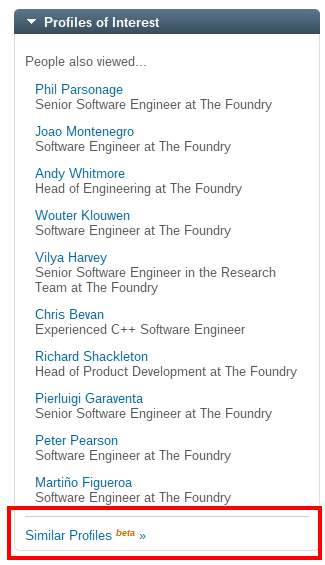

Still in beta, but this is a really cool and often overlooked feature. A unpredictable at times, but it's a great way to draw out a few extra profiles which could be of interest.

3. Tangent Search
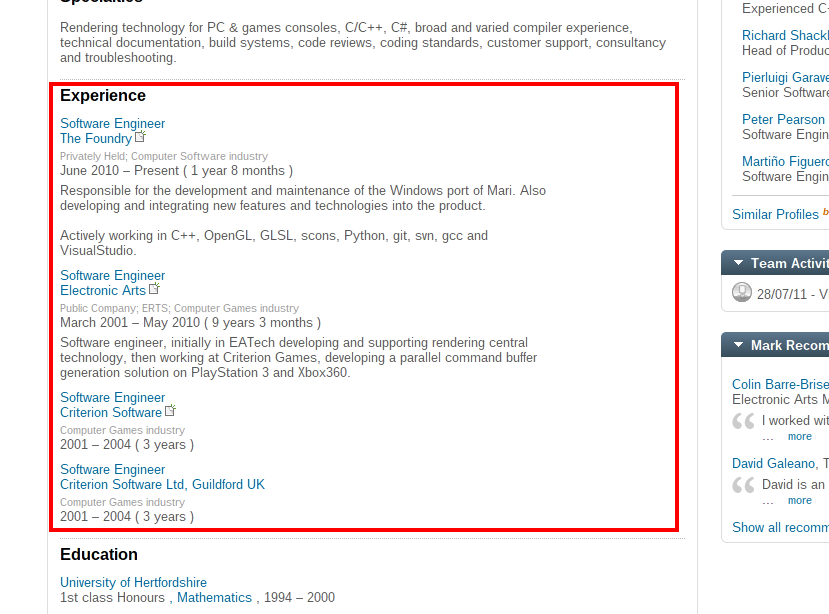

The best thing you can ever learn to do and make a habit of on LinkedIn. Go through those past companies; if your guy is a rockstar, he isn't going to have been working in any mediocre engineering teams for long. Copy his job title and past company into a search, and run through all those doing that job. The real gems here are the ones with no information filled in on their profile; the kind you would never have found with your standard search, because by doing any kind of search other than the name of the company you are excluding them entirely.


Profiles like this are why we tangent source. No technical skills listed that you would typically search for, but I'm willing to bet my bottom dollar that he is a C++ developer of a similar nature to our first chap. No degree listed on his Education that you could search for, but you know he's gone to an elite university, and the chances are it is Computer Science or related.

4. Groups & Associations

Have a look at the bottom of the above profile. See the 'Groups and Associations' section? He has one listed, CVMP. A quick search shows us that the CVMP 'aims to bring together the worlds of academic algorithmic research [...] to discuss new advancements and innovative applications' - also worth searching through, if you ask me. You can find some really great localised groups, particularly for events and conferences, which unlike some of the larger generalist groups contain a great group of relevant candidates.

5. Recommendations


Another often unlooked source of candidates; check out the recommendations section. See who is recommending this person; it will more often than not be their peers or superiors at work, and again if they are working at the same place as your original superstar candidate, then you can bet their skills are going to be relevant, and they have already done the work for you by putting their names right there.


8 June 2011

X-Ray Searching - The Basics

The idea of X-Ray searching is one which has been covered countless times across various recruitment blogs (most notably and thoroughly in Glen Cathy's outstanding Boolean Black Belt) - yet it is a technique which I believe is criminally underused, particularly here in the UK. Anyone familiar with the concept, please switch off now; this is very much a bare-bones guide to X-Ray searching.

Background

X-Ray searching is a term denoting a technique for searching LinkedIn (or other similar publicly available databases) via search engines such as Google or Bing. The overwhelming majority of LinkedIn profiles are public, which leaves them open to being indexed by any search engine for finding using familiar Boolean search techniques.

How?

Step 1: Load up Google.com. As simple as that. Nearly, anyway; if like me you are based outside of the United States, you will be redirected to Google's localised site (so in my case Google UK) - this can actually skew your search results slightly, so click on the link at the bottom of the page which says 'Go to Google.com' (or, navigate to google.com/ncr).


Step 2: Build up your search string. The basic building blocks will be:
site:linkedin.com (inurl:pub | inurl:in) -intitle:directory -inurl:groups -recruiter
You then need to enter your keywords; in this example, let us try a very simple search for an iPhone developer with some kind of Agile experience.
site:linkedin.com (inurl:pub | inurl:in) -intitle:directory -inurl:groups -recruiter iphone (agile | tdd)
Next; location. A little different to a standard Boolean search, but only in ways which make it easier for us. Not too long ago, LinkedIn added the country code to the beginning of their URLs which makes for easier filtering; as a quick example;
site:uk.linkedin.com (inurl:pub | inurl:in) -intitle:directory -inurl:groups -recruiter iphone (agile | tdd) "London United Kingdom"
3. Search! :)


Why?

There are several reasons why one would X-Ray search rather than search directly in to LinkedIn; the big ones, for me, are that first of all it is simply quicker to run a search and skim through names via Google than LinkedIn, and that you are not limited to connections within your own network, but to anybody on LinkedIn with a public profile. You are also limited to 1000 search results when using Google; in a (free) LinkedIn account, your search is capped to 100 results.

The big loss when using Google in comparison with LinkedIn itself are the advanced search operators and the control that comes with them; it is difficult to control the distinction between current or past employers, for example.

Conclusion

Add this to your arsenal of search tools. If it is something you don't do at the moment, do it! :)

I have only touched the tip of the iceberg of what is possible with this introduction; I will add more advanced tips from time to time, but as with any kind of sourcing, it is up to the individual to take these ideas and really make them your own. Take the examples shown here, tweak them, change them, and use them.

-TW

2 June 2011

First Thoughts: LinkedIn 'Apply' Button

Buttons seem to be very much in vogue at the moment, with both Google and Twitter recently joining the ubiquitous Facebook 'Like' button in popping up across the web. Not one to miss out on a good trend and recently buoyed by their mega-IPO, LinkedIn are set to join the buttonistas with their 'Apply With LinkedIn' button. Although not officially announced as of yet, details have emerged via GigaOM of the button which, according to a “source briefed on the feature”, is set to launch by the end of June.

The button is intended to be embedded in the jobs section of a companies website in order to streamline the recruitment process, effectively negating the need to upload a separate resume (traditionally a .doc / .pdf document). Aside from purely submitting their LinkedIn profile as a CV replacement, the hiring company can also ask a few additional questions, and the applicant is also presented with a few additional pieces of information such as connections who are affiliated with the company or additional similar job openings to which to apply.

Undoubtedly a good move for LinkedIn, as discussed by GigaOM; currently generating 43% of their revenue through their recruitment solutions, it makes sense in the decentralised state that the recruitment industry finds itself in that they move to ingrain themselves further in to the recruitment process. Another benefit to LinkedIn will be uplift in their own user base; if this does become the de-facto way to apply for jobs, then even those who try to avoid making any kind of social footprint on the web could persuaded to sign up.

The surface benefit for candidates is also clear; if this takes off, then a candidate will one-touch applications available to them across multiple job sites, customer websites and recruiter sites, cutting down on the time filling in cumbersome forms and uploading a CV. It also has the effect of putting your CV in the cloud, which has the practical effect of meaning you no longer need to use a USB Stick or Dropbox et al to apply for jobs if you are anywhere other than home, plus applying from mobile devices will be a more viable option.

And what does this mean to us as recruiters? After all the dust has settled, I don't think it will have too much of an impact on the industry. Agency side, at first glance, it looks like it takes a little more power away, and there is a lot of noise around social networking eliminating the need for recruitment agents at all; an overreacting certainly, and used properly this should prove to be another useful tool. I'm sure this will be adopted gleefully across the board by in-house recruitment teams; with this however comes the danger that you will be bombarded with even more applicants than you already receive, and with that a higher proportion of irrelevant / unqualified applicants, making the filtering process a longer and more arduous one. As a good agent will know, there is no better route in to a client than when they are wasting their own time shifting through a mountain of CVs; provide a solution to this and you're golden.

That said, I'm fully behind the move from LinkedIn; and I'm sure it will lend some weight to every cent of their $9.1billion worth.